
生成服务端节点配置
- 主机优化
bash
########### vim /etc/sysctl.conf
# ===== TCP Buffer =====
net.core.rmem_max = 67108864
net.core.wmem_max = 67108864
net.ipv4.tcp_rmem = 4096 87380 67108864
net.ipv4.tcp_wmem = 4096 65536 67108864

# ===== TCP 性能 =====
net.ipv4.tcp_congestion_control = bbr
net.core.default_qdisc = fq

# ===== 高并发 =====
net.core.somaxconn = 65535
net.ipv4.tcp_max_syn_backlog = 65535
net.ipv4.ip_local_port_range = 10000 65535

# ===== TIME_WAIT 优化 =====
net.ipv4.tcp_tw_reuse = 1

# ===== 文件描述符 =====
fs.file-max = 1048576
############# sysctl -p- v2config.sh配置(.env)
bash
##### .env与v2config.sh同级目录
V2RAY_PORT=6686
V2RAY_LISTEN_ADDR="0.0.0.0"
V2RAY_PATH="/opt/app"
V2RAY_WORK_DIR="${V2RAY_PATH}/v2ray"
V2RAY_CONFIG_FILE="${V2RAY_WORK_DIR}/config.json"
V2RAY_CONFIG_DIR="${V2RAY_WORK_DIR}/configs/"
## v2ray uuid 命令生成
V2RAY_CLIENT_UUID1=cd8b8eb8-0849-420a-8c66-4d84f938cb27
V2RAY_CLIENT_UUID2=a8c97892-d1ac-95c5-9bec-cae7d01e3e51
V2RAY_CLIENT_UUID3=b0e35abb-ebd3-8438-305b-36c8e7fd0956- v2config.sh生成V2Ray服务端配置
bash
#!/bin/bash

set -eu

##### 这个配置放在同级目录.env中
: '
V2RAY_PORT=6686
V2RAY_LISTEN_ADDR="0.0.0.0"
V2RAY_PATH="/opt/app"
V2RAY_WORK_DIR="${V2RAY_PATH}/v2ray"
V2RAY_CONFIG_FILE="${V2RAY_WORK_DIR}/config.json"
V2RAY_CONFIG_DIR="${V2RAY_WORK_DIR}/configs/"
## v2ray uuid 命令生成
V2RAY_CLIENT_UUID1=cd8b8eb8-0849-420a-8c66-4d84f938cb27
V2RAY_CLIENT_UUID2=a8c97892-d1ac-95c5-9bec-cae7d01e3e51
V2RAY_CLIENT_UUID3=b0e35abb-ebd3-8438-305b-36c8e7fd0956
'

## 服务器主机生成 V2Ray 5.38.0 服务配置
## 测试: v2ray test -c ${V2RAY_CONFIG_FILE} -d ${V2RAY_CONFIG_DIR}
## 运行: v2ray run  -c ${V2RAY_CONFIG_FILE} -d ${V2RAY_CONFIG_DIR}


##### 生成 V2Ray 配置文件
ENV_FILE=${1:-'.env'}
if [ ! -f "$ENV_FILE" ]; then
    echo "环境变量文件 $ENV_FILE 不存在!"
    exit 1
fi
source "$ENV_FILE"

##### 校验环境变量
# 端口
: "${V2RAY_PORT:?请在 $ENV_FILE 中设置 V2RAY_PORT 环境变量}"
# 监听地址
: "${V2RAY_LISTEN_ADDR:?请在 $ENV_FILE 中设置 V2RAY_LISTEN_ADDR 环境变量}"
# V2Ray 安装路径
: "${V2RAY_PATH:?请在 $ENV_FILE 中设置 V2RAY_PATH 环境变量}"
# V2Ray 工作目录
: "${V2RAY_WORK_DIR:?请在 $ENV_FILE 中设置 V2RAY_WORK_DIR 环境变量}"
# V2Ray 配置文件路径
: "${V2RAY_CONFIG_FILE:?请在 $ENV_FILE 中设置 V2RAY_CONFIG_FILE 环境变量}"
# V2Ray 配置目录
: "${V2RAY_CONFIG_DIR:?请在 $ENV_FILE 中设置 V2RAY_CONFIG_DIR 环境变量}"

##### 生成配置的目录结构
: "
v2ray/
├── config.json                   # 主配置文件(仅包含引用)
├── configs/                      # 配置片段目录
│   ├── 00_base.json              # 基础配置
│   ├── 01_log.json               # 日志配置
│   ├── 02_policy.json            # 策略配置
│   ├── 03_inbounds.json          # 入站配置
│   ├── 04_outbounds.json         # 出站配置
│   ├── 05_routing.json           # 路由配置
│   └── 06_dns.json               # DNS配置(可选)
└── v2ray                         # V2Ray 可执行文件
"
# 按照上面的目录结构创建配置文件
if [[ ! -d "$V2RAY_WORK_DIR" ]]; then
    echo "请先下载 V2Ray 并解压到 $V2RAY_PATH 目录下!"
    exit 1
fi

if [[ ! -d "$V2RAY_CONFIG_DIR" ]]; then
    mkdir -p "$V2RAY_CONFIG_DIR"
fi

if [[ -f "$V2RAY_CONFIG_FILE" ]]; then
    mv "$V2RAY_CONFIG_FILE" "$V2RAY_WORK_DIR/config.json.bak"
fi

##### 生成主配置文件
cat > "$V2RAY_CONFIG_FILE" << EOF
{
  "log": {},
  "policy": {},
  "inbounds": [],
  "outbounds": [],
  "routing": {},
  "dns": {}
}
EOF

##### 生成配置片段文件
cat > "${V2RAY_CONFIG_DIR}/00_base.json" << EOF
{
  "stats": {},
  "reverse": {},
  "observatory": {}
}
EOF

cat > "${V2RAY_CONFIG_DIR}/01_log.json" << EOF
{
  "log": {
    "access": "/var/log/v2ray/access.log",
    "error": "/var/log/v2ray/error.log",
    "loglevel": "warning"
  }
}
EOF

cat > "${V2RAY_CONFIG_DIR}/02_policy.json" << EOF
{
  "policy": {
    "levels": {
      "0": {
        "handshake": 8,
        "connIdle": 600,
        "uplinkOnly": 10,
        "downlinkOnly": 10,
        "statsUserUplink": true,
        "statsUserDownlink": true,
        "bufferSize": 524288
      }
    },
    "system": {
      "statsInboundUplink": false,
      "statsInboundDownlink": false
    }
  }
}
EOF

cat > "${V2RAY_CONFIG_DIR}/03_inbounds.json" << EOF
{
  "inbounds": [
    {
      "port": $V2RAY_PORT,
      "protocol": "vless",
      "listen": "$V2RAY_LISTEN_ADDR",
      "settings": {
        "decryption": "none",
        "clients": [
          {
            "id": "$V2RAY_CLIENT_UUID1",
            "level": 0
          },
          {
            "id": "$V2RAY_CLIENT_UUID2",
            "level": 0
          },
          {
            "id": "$V2RAY_CLIENT_UUID3",
            "level": 0
          }
        ]
      },
      "streamSettings": {
        "network": "tcp",
        "security": "none",
        "tcpSettings": {
          "acceptProxyProtocol": false
        },
        "tlsSettings": {
          "alpn": ["h2", "http/1.1"],
          "disableSessionResumption": false
        }
      }
    }
  ]
}
EOF

cat > "${V2RAY_CONFIG_DIR}/04_outbounds.json" << EOF
{
  "outbounds": [
    {
      "protocol": "freedom",
      "tag": "direct",
      "settings": {
        "domainStrategy": "UseIP"
      }
    }
  ]
}
EOF

cat > "${V2RAY_CONFIG_DIR}/05_routing.json" << EOF
{
  "routing": {
    "domainStrategy": "AsIs",
    "rules": [
      {
        "type": "field",
        "ip": ["geoip:private"],
        "outboundTag": "direct"
      },
      {
        "type": "field",
        "ip": ["geoip:cn"],
        "outboundTag": "direct"
      }
    ]
  }
}
EOF

cat > "${V2RAY_CONFIG_DIR}/06_dns.json" << EOF
{
  "dns": {
    "servers": [
      {
        "address": "223.5.5.5",
        "domains": ["geosite:cn"]
      },
      "1.1.1.1"
    ],
    "queryStrategy": "UseIP"
  }
}
EOF- 查看生成的配置
bash
CONFIG_FILE=/opt/app/v2ray/config.json
CONFIG_PATH=/opt/app/v2ray/configs
jq -n '
  # 读取基础配置
  input as $base |

  # 处理所有 configs/ 下的文件
  reduce inputs as $item ($base;
    if input_filename | test(".*log.*\\.json$") then .log = $item.log
    elif input_filename | test(".*policy.*\\.json$") then .policy = $item.policy
    elif input_filename | test(".*inbounds.*\\.json$") then .inbounds = $item.inbounds
    elif input_filename | test(".*outbounds.*\\.json$") then .outbounds = $item.outbounds
    elif input_filename | test(".*routing.*\\.json$") then .routing = $item.routing
    elif input_filename | test(".*dns.*\\.json$") then .dns = $item.dns
    else . * $item end
  )
' \
  ${CONFIG_FILE} \
  "${CONFIG_PATH}"/*.json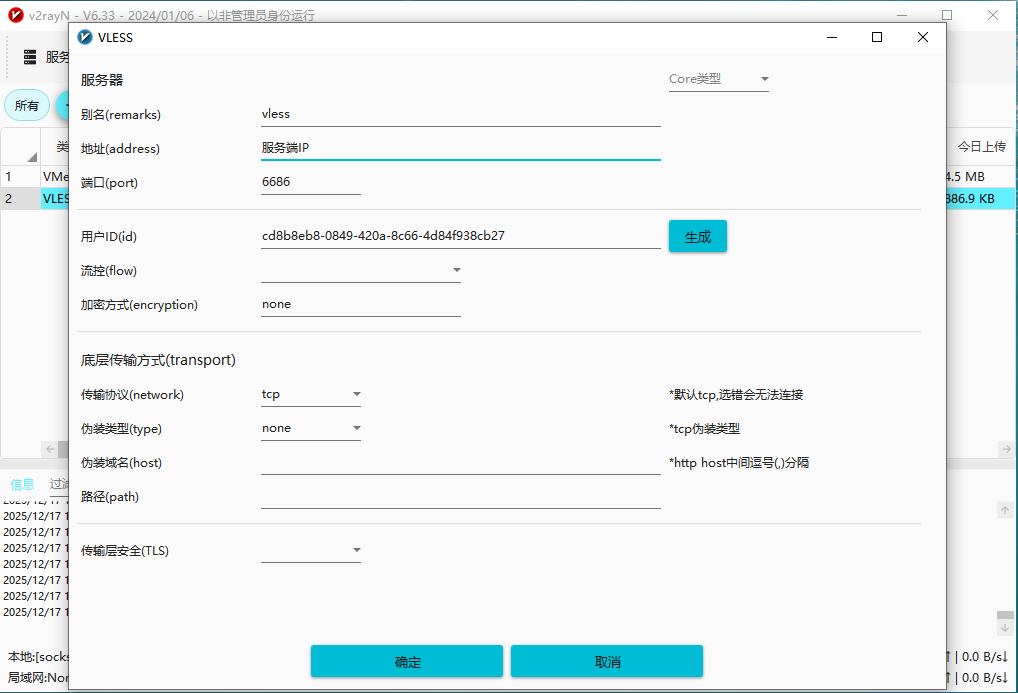
- 中继 V2Ray http服务配置
- relay_http.json
json{ "log": { "loglevel": "warning" }, "inbounds": [ { "port": 8080, "listen": "0.0.0.0", "protocol": "http", "settings": { "timeout": 300, "accounts": [ { "user": "admin", "pass": "123456" } ] } } ], "outbounds": [ { "tag": "to-master", "protocol": "vless", "settings": { "vnext": [ { "address": "主服务器IP", "port": 6686, "users": [ { "id": "cd8b8eb8-0849-420a-8c66-4d84f938cb27", "encryption": "none" } ] } ] }, "streamSettings": { "network": "tcp", "security": "none" } }, { "protocol": "freedom", "tag": "direct" } ], "routing": { "domainStrategy": "AsIs", "rules": [ { "type": "field", "outboundTag": "to-master", "ip": ["0.0.0.0/0", "::/0"] } ] } }- 启动中继V2Ray服务: ./v2ray -c relay_http.json
- Linux使用示例:
export http_proxy=http://127.0.0.1:8080
export https_proxy=http://127.0.0.1:8080
curl -U "admin:123456" -I google.com
- 中继 V2Ray tcp服务配置
- relay_tcp.json
json{ "log": { "loglevel": "warning" }, "inbounds": [ { "port": 8080, "listen": "0.0.0.0", "protocol": "vless", "settings": { "decryption": "none", "clients": [ { "id": "93cda0f3-8351-f06c-676b-6c3ba3850596", "level": 0 } ] }, "streamSettings": { "network": "tcp", "security": "none" } } ], "outbounds": [ { "tag": "to-master", "protocol": "vless", "settings": { "vnext": [ { "address": "主服务器IP", "port": 6686, "users": [ { "id": "b0e35abb-ebd3-8438-305b-36c8e7fd0956", "encryption": "none" } ] } ] }, "streamSettings": { "network": "tcp", "security": "none" } }, { "protocol": "freedom", "tag": "direct" } ], "routing": { "domainStrategy": "AsIs", "rules": [ { "type": "field", "outboundTag": "to-master", "ip": ["0.0.0.0/0", "::/0"] } ] } }- 启动中继V2Ray服务: ./v2ray -c relay_tcp.json
- 使用示例参考v2rayN的配置